Showing posts with label app review. Show all posts

Monday, May 5, 2014

App Reviews: Axel's Chain Reaction and Literacy Leveler

I've been playing around with a few apps recently, thinking about their potential use in a library setting. In case you're looking for some new tech tools to add to your library tablets, you may want to check out these two.

App: Axel's Chain Reaction by Laura Allison Pomenta Badolato
Platforms: iPad, iPhone/iPod
Content Area: eBook, STEAM
Age Recommendation: 7+
Premise: Axel is the protagonist in this school story eBook. Axel isn't always successful at school; though he's definitely clever, although his mind wanders and he tends to get frustrated when things don't turn out how he wants them to. That combination of personality traits could result is disaster when it comes to the school-wide fair, where each child creates a project or invention. Axel does struggle a bit, but ultimately he learns just how much he can accomplish with his mind and his hands.
     The app has fun interactivity throughout, which will add quite a bit of enjoyment and interest for children experiencing it for the first time. Bright colors and good pacing recommend the app as well.
Potential Library Uses: As a shared read-aloud in a program; on in-library devices for customers to use on their own

App: Literacy Leveler
Platforms: Android, iPad, iPhone
Content Area: Reading levels
Age Recommendation: All readers
Premise: Help readers and caregivers identify the reading level of books using the ISBN scanning feature or text/author search feature of this app to identify the Lexile, DRA, and GRL of books. Not all books will include reading level information, so for those who need to find a book at a specific level, it's possible to search by reading level; these searches will return a list of fiction and non-fiction titles that meet the reading level needs of the searcher. This app is an excellent tool to have out in the stacks to help quickly identify reading level of titles--something that happens pretty much on a daily basis at my library. It's invaluable and getting better as more and more titles are added.
Potential Library Uses: Reference


Friday, September 20, 2013

September Milk & Cookies Story Morning

The weather is finally starting to cool off here in Missouri--we're slowly inching closer to my personal ideal temperature range, 45-65. The break from the heat means many families are opting to spend weekend mornings out of doors, and who can blame them? Great weather is a true pleasure. Happily, I saw many families veteran and new at this month's Milk & Cookies Story Morning. Here's what we enjoyed before families headed out into the sunshine:

Opening Song: "Open, Shut Them"

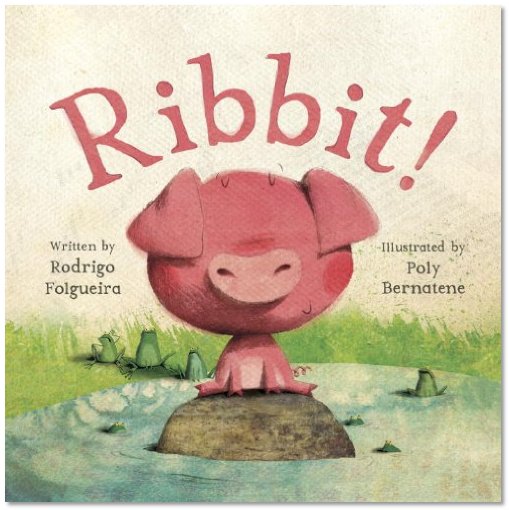
Story: Ribbit! by Rodrigo Folgueira
     I love sharing this newer story for a number of reasons. It allows me to engage the kiddos in making animal noises that relate to the page, and it also boasts a simple story about how, sometimes, we all just want to make a friend. When I share this story, the children and I make ever-more-dramatic "ribbit!" noises until the climax of the tale, at which point we have a new sound to make.

Song: "Do the Bird" by The Kerplunks
     This song gets everyone up and moving making silly motions like a variety of birds. How many different types of birds do 3- to 6-year-olds know? Judging by their enthusiasm for this song, they know plenty and are happy to imitate them.

Song: "I Know a Chicken" by Laurie Berkner, with egg shakers
     I've mentioned before that this is a favorite go-to shaker song for me. When we're in the bird song mood, how can I not include it?

Finger Play with an App: "Five Little Pirates" using Felt Board from Software Smoothie
     I love the Felt Board app, and I'm just getting the hang of really using it in appropriate story time settings. With its variety of felt shape options--people, scenery, animals, costumes, common objects found in rhymes and fairy tales--I've felt inspired to make digital felt board versions of some of the felt rhymes and stories that would be too cumbersome for my limited artistic abilities (and patience). When I make a series of felt boards that I intend to share in a particular order, I take screen captures of the boards I want to use and then add the images into a Keynote slideshow presentation. Easy peasy, all images are in the correct order and ready to share.
     For "Five Little Pirates," I create six different pirates on a pirate ship background--all of the pirates looked a bit different and wore different things, allowing me the option of talking to the kids about what they could see. They easily spotted the captain: the one with the sword and big pirate's hat. I added a slide into the beginning of my felt board slideshow to display the words for our rhyme, inviting caregivers to look at the words and join us in the telling:

Five Little Pirates
Five little pirates went sailing one day,
Over the seas and far away.
The captain cried, "Yo, ho, ho, ho!"
And four little pirates sailed back home...

Song: "Grey Squirrel"
     With a toss of our song cube, the kiddos and I sang "grey squirrel." Many a caregiver thought it was utterly adorable and took photos of their little ones shaking their bushy tails.

Song: "Head, Shoulders, Knees, and Toes"
     I've found that kids really like the whole idea of the song cube, so I've started doing two tosses (and two songs) in a row. Our second song was the perennial favorite "Head, Shoulders, Knees, and Toes," and as soon as they knew the song we would sing, the kiddos launched right into it.

Story: Little Red Riding Hood by Bernette Ford
     As part of my ongoing goal to share folk and fairy tales with the little ones, I pulled this newly-released version of Little Red Riding Hood to share at our story morning. The clean illustrations are great for crowds of varying sizes, and the pacing of this classic story never fails to enthrall. Each time I share such a "common" story, I find that it seems more and more children haven't heard the tale before--and those who have are happy to see another telling.

Song: "We're Going to Kentucky"
     What's not to love about a song that lets us work on our marching, our shaking/shimmying, and our turning around/twirling? Always a hit.

Milk and Cookies Time!
     I had two teen volunteers in the room for this particular story morning, which meant I had help in passing out the milk and cookies to the kiddos. While the volunteers poured the milk, I went around with alphabet-shaped cookies--perfect for reinforcing letter knowledge.

Free Play Time
     The biggest hit at play time on this particular day was definitely the play food station I set up. I put out play dishes, play sandwich fixings, and play pizzas, and boy oh boy did the kiddos get down to business making meals for everyone in the room. Vocabulary was absolutely soaring--I heard talk about foods, about drinks, about how to make foods, about kitchens, about family members and what they like to eat. The only time the chatter stopped was when we had to pretend eat our meals and sip our drinks. These play food items are temporarily at my branch while I process our district's early literacy play kits after their first year of branch-to-branch travel, but I will certainly be looking to have some play food items at my branch permanently.


Monday, July 22, 2013

July Milk & Cookies Story Morning

For this month's edition of my library's Milk & Cookies Story Morning, a great group of mostly 2- to 4-year-olds gathered in the programming room. It's been hot here in Missouri, so families willing to brave the heat to come to the library enjoy getting to relax in our air-conditioned spaces for a while. I'm happy to give them opportunities for hanging around in a program like this:

Opening Song: "Open, Shut Them"

Story: The Watermelon Seed by Greg Pizzoli
     This bright, simply illustrated picture book hits on a topic that doesn't seem too far-fetched to most youngsters: a crocodile who loves watermelon accidentally swallows a seed, and he's worried he's got a watermelon growing in his belly. This book offers great opportunities for talking about what seeds need to grow, what happens when you swallow something, etc., as well as a perfect invitation for giggles when the crocodile gives a giant burp.

Song: "We're Going to Kentucky"
     I learned this song at Guerrilla Storytime at #ala2013, and I've used it many times since. For this story morning group, I handed out egg shakers to accompany our shaking as per the song's instructions. We sang the song three times due to its popularity, with the final verse sung quickly enough to prompt us all to fall down dizzy at the end.

Story: The Kissing Hand by Audrey Penn, from Oceanhouse Media
     This book app shares the story of Chester as his mother helps him overcome his nervousness about going to school. This story has long been a classic for a reason, and I decided to share it this time because preschools will be starting up again soon. I projected the app in its "Read it Myself" mode, which allowed me to go through the app at a pace that suited the children in attendance. I read the story with the help of my own Chester raccoon puppet, whose paw the kids enjoyed kissing after the story. How's that for transmedia storytelling?

Songs: "I'm a Little Teapot" and "The Itsy Bitsy Spider"
     We rolled the song cube to see what song we would sing next as a group. After twice singing "I'm a Little Teapot," the kids asked to roll the song cube again. I of course obliged, and we launched into an enthusiastic rendition of "The Itsy Bitsy Spider."

Story: Little Rabbit Foo Foo by Michael Rosen and Arthur Robins
     For the folk/fairytale portion of our story morning, I decided to share this great version of "Little Bunny Foo Foo," a song it appears many children no longer hear from their caregivers. This small book boasts so many fantastic qualities and early literacy opportunities: it's got great vocabulary ("attitude," "goblins"); it reinforces counting; it's got a repetitive style that draws kids into participating and helps them remember the story; it can be sung; and it's got a bit of silliness mixed in with the moral.

Milk and Cookies Time!
     We enjoyed some cinnamon Teddy Grahams and milk immediately after finishing our storytime portion of the morning. Mmm!

Free Play Time
     As with previous implementations of this program, I set out a variety of my library's educational and open-ended children's toys for the free exploration of the children in attendance. The science station was once again a hit, especially the magnets. Also extremely popular were the library's new alphabet machines, which I decided to purchase after reading a great testimonial about the toys in someone else's library (I can't remember on whose blog I read about it; that bookmark got lost in the transition-from-Google-Reader shuffle. [Update: the original post was on Anna's blog. Thanks to reader Amanda who pointed me to the post!]). I saw kids and caregivers identifying letters, naming images, creating patterns--really, these things are quite versatile.

~~*~~

How have you been incorporating play for preschoolers at your library this summer?


Monday, June 24, 2013

June Milk & Cookies Story Morning

I'm now four months into offering a monthly Saturday preschool program--Milk & Cookies Story Morning--here at my library. Attendance seems to be growing steadily, with each program pretty well split between new faces and return attendees. For my June program, I even had a teen volunteer in the room to help keep things running extra smoothly while the kids and I got silly. Once again, my four content goals for this story time program remained the same: interactivity, transmedia, folk/fairy tale sharing, and free play time. Here's what we did:

Opening Song: "Open, Shut Them"

Story: Shark in the Park! by Nick Sharratt
     My colleague Angie introduced me to this book during my first month on the job, and I have loved it ever since. It's a brief, mostly-rhyming story of young Timothy Pope who, having just received a telescope, takes it to the park to look at things. What does he think he sees? A SHARK IN THE PARK! I like to encourage kiddos to use their own telescopes (hands in a telescope circle in front of one eye) as we read this clever book.

Song: "Grey Squirrel"
     The song cube indicated that we should sing "Grey Squirrel," and sing it we did--complete with swishing our bushy tails.

App: Safari Animals by Simms Taback, part of the Simms Taback Children's Book Collection app by CJ Educations
     I turned off the sound and used the read to me function of this app, which let me move through the pages at a pace that allowed the children and me to interact with what we were reading/seeing. The premise of this story is basic: the viewer can only see part of an illustration of an animal, and the words on the screen give hints to its name. This story pacing gave us plenty of time to talk about what we know about safari animals (giraffes, hippos, ostriches, lions), and we had fun making sounds and moving our bodies like the animals would. I mentioned to attending caregivers that this is an example of using technology in an interactive and educational way.

Song: "Rock and Roll Freeze Dance" by Hap Palmer
     This short song introduces the idea of dancing until the music stops, at which point everyone is meant to freeze. It's a great, short, wiggles-reducing musical interlude.

Story: "Stone Soup"
     I put together a kit of props for telling the folk tale "Stone Soup" that includes a bowl, a spoon, a stone, and cut-out pictures of various types of vegetables. I passed out the vegetables and spoon to children in the room, and together we made soup as I told the story. Because of the younger age range of my attendees, we dumped a bunch of veggies in the soup pot at once--attention wasn't going to last much longer. I'd use this story again with a slightly older audience.

Song: "If You're Happy and You Know It"
     The kids insisted we roll the song cube again, and this song is what it landed on. Who am I to say "no" to a joyful request for a song?

Song: "Silly Dance Contest" by Jim Gill
     We finished the story time portion of our morning with this wonderful crazy-to-cool-down song. Try it if you're looking for a way to get kids moving without them turning totally bonkers at the end.

Milk and Cookies Time!
     Our menu included chocolate Teddy Grahams (much to everyone's delight) as well as 2% milk or water. These smaller cookies seem to have gone over the best of any of our cookies so far; I'll be sticking to the small bites concept in the future.

Play Time!!
     I rolled back the partition to the other side of our meeting room to reveal four play stations: a science station (magnets, magnifying glasses, balance scale); a cars and garages station (all wooden toys); a concepts station (writing, colors, puzzles, counting); and a building station, which featured my branch's early literacy play kit for the month, chunky blocks. Four families stayed for a full half hour of play after the snack, and I was excited to see how many caregivers got down on the sit-upons at the stations to interact and play with their own children and the kids who approached them. I also used this time to invite families to sign up for summer reading if they hadn't already. I got six new summer readers registered, which made me happy.

~~*~~

I love that this program has a very simple level of input from the caregiver--just come to the library!--with a huge potential for return. Early literacy story time, information on media literacy, relaxing time to enjoy a small snack, productive play time...even summer reading. That's a lot of bang for zero bucks.


Tuesday, May 28, 2013

May Milk & Cookies Story Morning: Plenty of fun on a holiday weekend

Over the weekend, I led my third ever Milk & Cookies Story Morning family story time program. For more specific details of my rationale in offering this new weekend program, you can see my first two posts on the topic. Suffice it to say that my personal must-haves in the program remained the same: transmedia, interactivity, a folk/fairy tale, and time for free play--this time including some simple science activities.

The program went really well, and a good crowd attended despite it being a holiday weekend. Here's what we did:

Opening Song: "Open, Shut Them"

Story: Up, Down, and Around by Katherine Ayres
     I prefaced this story by saying it was about growing all sorts of vegetables, and I asked the kids what vegetables they knew. Throughout the story, we would point out the vegetables we like. The last page shows a feast of foods created with the veggies, and we had a fun time naming all the dishes.

Song: "Five Little Ducks"
     A roll of the song cube dictated that we would be singing "Five Little Ducks," so I pulled out five little rubber duckies as a visual counting aid. During the first verse of the song, I was pretty much the only one in the room singing and making the mamma duck's big "QUACK! QUACK! QUACK!" By the final verse, though, everyone was joyfully singing with me. A wonderful benefit of repetitive counting songs and rhymes: kids catch on and gain confidence as they go.

App: Peek-a-Zoo: Toddler Peekabo at the Zoo by treebetty
     To use this app in an interactive way in the program, I turned off narration and background music--all noise except the animal noises. I cued the app to the first "page," which shows a lion crouching in some grass. When it was time for the app, I turned on our tv and we took a walk through a zoo. Each animal has a two-stage process: one where you can try to guess the animal by what you see on the screen, and the second when the animal appears in full and you hear the sound it makes (the second page also shows the name of the animal written out, so one could talk about letters, too). I asked lots of questions to help kids guess the animal they might see next, and we used clues from what we could see in the animal's environment to help us figure it out. One of the things I love about this app is that the animals are not just your stock zoo animals--it includes a number of lesser-shown ones, like walruses, too. I engaged caregivers in a brief tidbit about the difference between using technology with children passively--e.g., sitting them in front of a tv or device unattended--and actively--i.e., engaging in the technology with them.
     As the picture shows, my iPad setup includes using a Digital AV Adapter and HDMI cable. I operate the app from the iPad, which is mirrored onto the HDTV screen.

Song: "I Know a Chicken" by Laurie Berkner
     I love this song and use it all the time. It's a perfect length for keeping kids interested, and when I pass out the egg shakers, everyone's excitement levels go up a bit. That makes for a great interactive program element.

Story: The Three Billy Goats Gruff by Paul Galdone
     Only one or two kids in the program were already familiar with this story, so I was very glad I selected it for our story time. It's a great one for getting kids involved in trip, trapping across the bridge, and it also allows the use of some great silly voices for the billy goats and troll.

Activity: Rhythmic Play with Scarves
     I handed out multi-colored scarves to all of the children, and once they had stood up we began waving our scarves. I put on "Dancing Scarf Blues" by Carole Peterson, and we had some fun waving our scarves around to the music.

Milk & Cookies Time!
     This weekend's selection included chocolate chip cookies and 2% milk or pink lemonade. There was at least one dad who looked like he wanted a cookie, too, but when his wife opted not to have one, he did the same. The kiddos loved it, though.

Free Play
Our science table
     As with previous weeks, I set out little play stations with lots of the library's stock of early learning toys. We had building blocks and pipe builders, build-a-monsters and wooden cars with garages. New this time were some magnetic writing boards--always great to work some writing in!--and a repurposed train table frame that I turned into a science station. I set out magnifying glasses with seashells, a starfish, and feathers to explore up close; magnet wands with a variety of sizes of paper clips, washers, and jingle bells; and a balance scale with random objects to play with weight. Every child went to the science table for at least a few minutes, which made it the hit of the free play time. All the stations get pretty well explored and the toys played with--nothing like some free time to interact with the world as you please.

~~*~~

An aside: I am starting to realize that, if this program's attendance keeps growing and I still really want to focus on the free play (which requires space), I may have to adapt the milk & cookies portion of the program. My program room isn't big enough for a larger crowd to have space to sit down and move around in story time, sit at tables for the snack, and also have toys set out with room to play. I'm going to think about options like lunchbox-size cookie snack bags and juice boxes or milk cartons--things that can be enjoyed, picnic-style, without big tables and chairs and without to much threat of spills. Anyone have any ideas?


Monday, April 29, 2013

Milk & Cookies Story Morning, Take 2: In which we learn the word "encore"

I blogged earlier this month about a new story time program I began offering in March, a Saturday morning Milk & Cookies Story Morning. My main impetus for this new program format and time was better fitting into the schedules of families who can't necessarily make a weekday story time. So far, I'd say it looks like I'm going to be successful on that front: I was averaging about 6 attendees at my previous Evening Family Story Times; the debut M&C Story Time drew in 17 people; and April's M&C Story Time had 36 people attend. Those are big jumps, and our Saturday morning story times are seeing lots of new faces. I love programs that invite new library users.

A few other goals of my Milk & Cookies Story Morning, which of course will continue to develop as the months go on:
  1. Make it transmedia. I include app-based technology once in each program. This will be in the form of a book app, felt board story, or musical enhancement.
  2. Make it interactive. We roll our song cube to determine what traditional song we sing. We sing and dance to songs heavy on movement aspects. And we end with some parachute fun, which never fails to excite and engage.
  3. Include a folk or fairy tale. This goal is a newer one for me, but it's becoming more and more important. After months of visiting preschools and daycares for story time visits, I saw that many kids haven't heard the "traditional" folk and fairy tales; it seems grown-ups assume that, because they are traditional, the kids already know them. Not so, and so I'm including one at each program. Kids who have heard them before still delight in retellings.
  4. Play time is integral. There is space and time for free play after each of these programs.

The April Milk & Cookies Story Time was an encore program of sorts, the second time I offered the new program time and format. As encores go, I would consider it a rousing success. Here's what we did:

Opening Song: "Open, Shut Them"

Story: Scary Mary by Paula Bowles
     This story invites lots of open-ended questions about the pictures, what's happening in the story, and the topic of making friends. It also provides great opportunities for making animal noises and motions, a huge bonus for kids' morning energy.

Song: "I'm a Little Teapot"
     A roll of our song cube landed on "I'm a Little Teapot," so the kids and I stood up to sing and act out the song. We had a huge round of applause from the grownups afterward, and I took the opportunity to introduce the word "encore." We offered to sing another song for the grownups, who acted delighted, and we performed "I'm a Little Teapot" again.

Book App: Just Lost! by Gina and Mercer Mayer from Oceanhouse Media, Inc.
     This wonderful Little Critter story follows Little Critter as he gets separated from his mom and siblings at the mall. Oh, no! he thinks; My mom is lost! The story follows Little Critter as he resolves to be brave, tells a grown-up that his mom is lost, and spends a little bit of time amazed at the mall security office before being reunited with his family. As I shared the book app with the audience (it was mirrored on our HDTV), I asked questions about what the kids could see in the pictures, what they thought would happen next, what they would do if their mom or dad got lost. I'll admit I was initially unsure if this app would be too long for the kids' attention spans, but they were totally engaged in the story. They even wanted to share their own lost stories after we were done. Once again, I was blown away by the literacy potential of sharing an app with kids in an intentional and interactive way.

     We had a dinosaur marching parade of sorts for this song, with many of the children opting to join the main group in a marching dino circle. A few stayed on the sidelines with their caregivers, but they were definitely stomping their feet and doing the other actions with the music.

Story: The Three Little Pigs by Bernadette Watts
     This version of the Three Pigs story offers a great intro for new listeners, with great illustrations that can get kids talking about what's happening. The wolf doesn't get cooked in the end of this version, so if that's the tale you want to tell, there are other options.

Activity: Parachute Play
     I got the parachute out of the bag, and I threw on top of it three beach ball-style globes. The exercise of having fun with the parachute while trying to keep the globes on it was a great activity for concepts of teamwork.

Milk & Cookies Time!
     This time we had Nilla Wafers, 2% milk, and lemonade. One mother brought her own snacks for her kids due to food allergies, and I was so glad her children were able to participate in that portion of the program.

Free Play
     I got out three tables' worth of toys again, ranging from wooden garages and cars to counting cookies and building materials. This is the portion of the program that I am most excited about--it offers great opportunities for me to interact with each child, and I can also model behavior for interacting with children as they play. This is also the time in the program when grownups can have conversations, and many of them seek out conversations with me. They ask about great apps, what programs we have coming up, what else the library offers... really, the PR potential of this free time is amazing. And all while the kids are exploring the world through free play.

~~*~~

I know at least one other librarian, Angela in Nova Scotia, has adapted this program format for her own library customers and goals; see her version here. Anyone else including apps in programming? Offering weekend story time options? Focusing on building kids' knowledge of folk tales? I'd love to hear what you're doing.


Monday, April 1, 2013

Milk & Cookies Story Morning makes its debut

In my library district, each branch strives to offer a monthly story time option for families whose weekdays are booked--due to work, day care, etc., these families cannot make it to our regular story time series. I had been offering monthly Evening Family Story Times, and while kids always had fun at these programs, they weren't particularly well attended. I know I'm not the only librarian who has wrestled with this issue, but that didn't help solve the problem: despite their expressed intentions, our library families couldn't regularly attend story time on weekday evenings. So, starting in March, I began trying something different: a monthly Milk & Cookies Story Morning, which takes place on a Saturday morning when I was already scheduled to work.

Milk & Cookies Story Morning, in addition to taking place on a Saturday morning, boasts a few differences from our regular weekday program series:
1) The story time is transmedia; I purposefully include a non-fiction picture book, a fiction picture book, and a book app for the story portions of the program.
2) Our songs are very interactive. We choose our first song by rolling the song cube (similar to Anne at So Tomorrow's "Roll-a-Rhyme"; funny how one idea can be on the minds of so many librarians at once!), then our later songs all involve substantial motion.
3) After our 30-ish minutes of story time, we break for milk and cookies.
4) The room is open after the program with plenty of educational toys ready for the kids to play with as long as their parents/caregivers allow.

The inaugural Milk & Cookies Story Morning was very successful, in my book: we had 17 attendees (as compared to our usual 5-9 at the previous evening story times); parents were thrilled to get some direction in using apps with their kids; and both kids and caregivers were excited to get down and play with our selection of educational toys, all of which promoted creative building, problem-solving, and/or real-world role play. These families expressed excitement at getting to make the library a destination one Saturday every month, a role I am happy we can play.

Here, specifically, is what we did:

Opening Song: "Open, Shut Them"

Story: Homes in Many Cultures by Heather Adamson
     I peppered the reading of this simple non-fiction test, full of big, beautiful photos, with questions about the kids' own homes. They really started to engage with the text and were very interested in the different types of homes around the world.

Song: "Head, Shoulders, Knees, and Toes"
     A roll of our song cube prompted us to sing this classic. All the kids, as well as a few of the caregivers, got into the action.

Book App: City Animals by Simms Taback, part of the Simms Taback Children's Book Collection app
     In preparation for sharing this app in story time, I had hooked up my iPad to our HDTV via Apple 30-pin Digital AV Adapter and HDMI cable. I had cued the app to where I wanted it to start before the program, that way all I needed to do was turn on the television to begin sharing the app. I opted to mute both the iPad and the tv, preferring to read all the text with the kids myself. The kids loved getting hints about the different city animals they were seeing, and they excitedly guessed what the animals were based on their visual and verbal cues. The pacing of the app, while it might seem slow to us grown-ups, was perfect for sharing with a group of kids--the transitions gave all of the kids a good amount of time to process everything they were seeing and thinking. Parents asked for the name of the app after seeing how well their kids responded to it.

Story: Goldilocks and the Three Bears by Amanda Askew
     I am always taken aback by how many kids are not exposed to "classic" tales of childhood. I like to work them into my story times when I can, and they almost always delight. This tale was no exception.

Song: "The Beanie Bag Dance" by Greg and Steve
     I had brought the library's collection of Beanie Babies into the program, and at this point I asked each child to choose a "beanie buddy" to help with the song. We used to bean animals as our bean bags for the song.

Activity: Parachute Play
     Our wrap-up to the formal story time portion of the program was using the parachute. We started off with all the kids grabbing handles, and they tossed their beanie buddies into the parachute for some slow--then fast--parachute action. Then, when temptation could no longer be ignored, the grown-ups helmed the parachute so the kids could enjoy running and sitting under it. Always a hit.

Milk & Cookies Time!
     I had cookies without nuts, 2% milk, and lemonade available, as well as napkins and small glasses. The caregivers helped their children with their snacks while I opened the other half of our program room for play time.

Free Play
     I set out selections of the library's educational preschool-age toys: building pipes, build-your-own-creatures, wooden garages and vehicles, shape puzzles, and interlocking wooden blocks. The play stations were on tabletops set directly on the floor, allowing kids to sit on the ground as they played while creating delineated spaces. Every child enjoyed getting to move from station to station at their own pace, enjoying new toys and interacting with peers. I had so many parents thank me for opening the program space for free play, and all of the children were excited to talk about the play activities they were doing. Having the room open post-story time for free play is, hands down, the best way I can think of to really engage kids in that "play" practice of ECRR--and it prevents great opportunities for having informal discussions with caregivers, too, allowing library staff to share early literacy tips. If your story time and staff schedules allow it, I highly recommend it.

~~*~~

An interesting note about including an app in story time: Before sharing the app, I asked parents how many of them a) had tablets or other smart devices and b) used them with their children. All adults present responded to both questions in the affirmative. I was expecting a majority affirmative, but not necessarily the unanimous "yes" I got. But there you have it: all of the attending families were already using the technology with their kids. They expressed happiness at the library presenting information about media use and great apps to share with young children; they liked getting some input and direction in how they use the technology to interact with their kids. If there was any semblance of doubt before, I am now 100% in the camp that intentionally incorporating technology in youth services is beneficial for children, caregivers, and library staff.

Monday, March 11, 2013

App Review: Presentation Apps

One of my goals for 2013 is to share apps that I'll be incorporating in my library, whether as part of programs, in-library displays, or app advisory. Today I want to focus on three of the presentation apps that I regularly use to supplement my programming. I use them all different and in different programming scenarios. They are all available for free for the iPad.

SlideShark

How it works: The SlideShark app accesses slideshows that the user has uploaded to his or her online SlideShark account. An account is free, although it does come with a storage limit of 100 MB (plan upgrades run from $49-$95 per year). Users are able to upload presentations (Powerpoint, Keynote) to their accounts; sync desired presentations to an iPad; and share presentations publicly if desired. When connected to a projector and in presentation mode, SlideShark allows users to time their presentations and see their presentation notes. Users can also set presentations to autoplay with options of slide length and looping.
When I use it: So far I have used SlideShark for two types of programs. The first is for presentations for library staff and workshops for caregivers. When I offered early literacy workshops for our local Parents as Teachers group last autumn, I modified the official ECRR2 slideshow to reflect my specific content. During the event, I managed the entire presentation as I went, choosing when I moved from slide to slide. I loved having my notes visible to me on the iPad while caregivers only saw the slides.
     The second type of program for which I've used SlideShark is a school-age program in which I wanted a slideshow to be on in the background. A perfect example is my recent potato chip history and tasting program. I shared information on the history of the potato chip at the beginning of the program, but I wanted that information to be on a screen while kids were going about their activities in the room. I uploaded a Powerpoint I'd made, set the presentation to loop and autoplay with slide changes every 15 seconds, and let the app do its thing. Children and caregivers both liked having something interesting and informative to look at between activities.


Prezi

How it works: The Prezi app makes mobile all the great visual elements of the original online Prezi presentation. A free personal Prezi account comes with 100 MB of storage space (upgrades run from $59-$159 a year) as well as the service's core features, which include beautiful templates, great editing abilities, and useful help services. Prezi presentations can be created and edited both online and in-app, which means last-minute changes to presentations don't require re-syncing the device.
When I use it: My favorite use for Prezi presentations so far is in my school-age science programs. Each program opens with a brief introduction to our topic of the day; our brief intros would require a slideshow presentation of just one or two slides, limiting the options for great visual engagement. With Prezi, however, a small amount of information can be presented in a beautiful and visually-exciting way that holds attention much better than static slideshows. I frequently add images, video, bursts of color, and interesting pathways to my Prezis to keep kids' attention.
     I've also used Prezi for "Meet the Artist" school-age programs, during which lots of artwork by the featured artist is shown for the audience. Prezi makes that artwork pop much more than a slideshow can, and the creative possibilities for setting up the presentation fit better with the mood of an art program.


Haiku Deck

How it works: The Haiku Deck app is an all-in-one slideshow creation and presentation app that doesn't require a link to an online account. The app is meant to facilitate creation of simple, beautiful slideshows. Users can manipulate a finite number of aspects of slideshows, which I think really streamlines the creation of great presentations. Users can give a presentation a title and a theme, and each individual slide can contain a title, some additional text (either one line or bulleted/numbered lists), and a full-screen image; there are fourteen slide layout options, and users can add images of their own or search for high-res images in-app.
When I use it: I have used Haiku Deck, to great success, for my Stuffed Animal Sleepovers. These story time programs necessitate creating an image-heavy slideshow of photos of kids' stuffed animals doing sleepover activities at the library, then showing that slideshow at a program the next day. Before I had Haiku Deck, that process meant five distinct, and sometimes time-consuming, steps: 1) take photos on the digital camera or library tablet; 2) upload photos to a computer; 3) create the slideshow in Powerpoint; 4) upload the Powerpoint to a slideshow app; 5) show the slideshow. With Haiku Deck, however, the whole process happens on the iPad. I take pictures with the iPad's camera, immediately add them to slides in my slideshow on Haiku Deck, add a bit of text, and I'm ready to present. What was originally a 90-minute or more process was down to about 20 minutes. The slideshows are beautiful, image-focused, and shareable with a link, which caregivers who want a copy of the slideshow really appreciate.

~~*~~

Those are the three presentation apps you'll be most likely to find me using in the course of my library work. Do you have any apps you rely on for presentations? I'd love to hear about them!


Monday, January 21, 2013

App Review: TinkerBox

One of my goals for 2013 is to share apps that I'll be incorporating in my library, whether as part of programs, in-library displays, or app advisory. Here's this week's review:

TinkerBox App Review

Platforms: iPad, iPhone/iPod
Content Area: Physics, Engineering
Age Recommendation: 7+
Premise: A brief tutorial introduces new users to the array of simple machines and tools (springs, conveyor belts, scissors, buttons, and blocks, to name a few) that are used throughout the app's two modes of play: Puzzle and Invent. In Puzzle mode, players are given a task to complete--for example, to get a ball in a bucket. Each level begins with a number of tools and machines in place; it is up to the player to determine how to use the additional pieces in the supplies bar in order to complete each level's task. There is some flexibility as to how each level can be solved, which keeps some of the more difficult levels from getting too frustrating. Players are able to test their creations as many times as they need to in order to tinker with their set-ups and solve a level. In Invent mode, players have access to all of the game's machines and tools and are free to create any sort of contraption. Inventors can save their creations, and there is also an e-mail option for when the device is connected to the internet.
     The TinkerBox app is well laid-out with clear HD graphics, which helps players to streamline their puzzle-solving process. All machines and tools are easily manipulable, perfect for users who are not yet completely comfortable with a touchscreen interface. The app also includes two levels of sound that can be switched off: background music and SFX (which gives sound to the machines and tools in action). This app does a great job of introducing the physics of a number of simple machines and tools in a fun, non-competitive context. I can easily see engineering-minded children getting really into the gameplay.
Potential Library Uses:
  - Recommending in reference interviews
  - On library-owned devices for customer use
Lite Version Available?: No, but the app is free

~~*~~

See my first app review post for links to additional app review sources. And please chime in in the comments with your favorite apps and review sources!

Friday, January 11, 2013

A Few Things On My Mind

I read library blogs every day. I love the tips and tricks, the program idea sharing, the camaraderie that shows any time the media misunderstands (again) libraries. I love hearing about new books and reading what fellow librarians are thinking about them. Perhaps what I love most, however, are the meaningful conversations that pop up around timely topics. Blogs are a great way to see what sorts of things are on the minds of librarians at any given time. Here are the three topics that have been on mine thanks to some great posts:

Programming
     I was one of the many librarians to forward an article including a library program on pig-butchering to my coworkers. I also linked my branchmates to a follow-up article from The Atlantic Wire that further explores the untraditional realms of programming to which libraries are now offering access. I love that articles like these help us to think about what it means to program in a contemporary library. What do our communities want and/or need from a third space like a library? The particular answers may seem crazy at first, but so do a lot of really cool things.

Unprogramming
     That was programming. But what about what Marge Loch-Wouters of Tiny Tips for Library Fun has dubbed "unprogramming"? I love the sort of questions that the idea of unprogramming your programs makes you ask. For example: Is what the attendees get out of the program worth the amount of time I put into planning the program? How do our programs tie back to the library's mission, values, and/or resources? Is it time to retire/revamp old or traditional programs that have become tired? Basically, is what we offer worth it for our customers? I'm thinking of coming up with a list of such questions to ask myself and my staff before we commit to future schedules of programs--we want to make sure that we're intentionally offering what's best for the community and what makes sense in terms of resource use.

App Reviews
     Cen Campbell at Little eLit has been blogging this year about what librarians should consider when they review apps. She gives a thorough reasoning behind the importance of a variety of criteria: age appropriateness; in-app controls; interactivity; affordances; early literacy support; annoyance factors and customization; and intended use. I am finding these posts incredibly thought-provoking as I tweak my own plan for how to incorporate apps into my library space. Cen also shares great examples of the criteria she discusses, and I'm happy to have a list of apps to try after reading her posts.

~~*~~

Those are three big topics that seem to be on my mind lately as well as on the minds of my colleagues. As programs kick back into high gear now, I will make a concerted effort to still give these topics as much consideration as I can in order to determine how they can inform what we do at my library.

What library topics have you been ruminating on lately?


Monday, January 7, 2013

App Review: Science360 for iPad

One of my goals for 2013 is to share apps that I'll be incorporating in my library, whether as part of programs, in-library displays, or app advisory. Here's this week's review:

Science360 for iPad App Review

Platforms: iPad
Content Area: STEM
Age Recommendation: 4+
Premise: The app provides users access to hundreds of hi-resolution images and videos running the gamut of STEM topics. The NSF curates all of the content, which it gets from scientists, academic institutions, and science centers. All content is accompanied by a date, brief description, and citation, and I would have no qualms about using the content in reference requests for science reports. The app provides users lists of related videos based on what the user is watching, making the app engaging to browse casually. Content is also tagged with topic terms, and the tag index is searchable. The NSF frequently updates content, so information in the app relates to recent and groundbreaking science work. There is also a news feature where users can quickly access this newest content in the app.
     The interface of the app is very clean and easy to use. Content is shown as thumbnails on what appears to be the inside of a sphere (with the user inside, able to navigate the whole surface, in a manner that reminded me of Cerebro from X-Men), and simple finger movements allow navigation through the thumbnails and between content. Users are also able to save favorite items and e-mail content/post content to Twitter/Facebook; these features cannot be turned off, which may affect how some libraries choose to use the app in their facilities.
Potential Library Uses:
  - Recommending in reference interviews
  - On library-owned devices for customer use (headphones may be preferred for videos)
  - In programs to share videos relating to STEM topics
Lite Version Available?: No, but the app is free

~~*~~

See my earlier app review post for links to additional app review sources. And please chime in in the comments with your favorite apps and review sources!

Monday, December 24, 2012

App Review: Bridge Constructor

There are many conversations going on in the youth services world right now regarding tablet technology and apps in library services. The way I see it, it's my job to select great books, audio, and audiovisual content, and I use these exemplary materials in my programming--great apps should be no different. With that in mind, I am debuting app reviews on this blog. I aim to share apps that I have found to be entertaining, engaging, educational, and well-designed. Without further ado, the first review!

Bridge Constructor App Review

I've built a stable bridge!
App: Bridge Constructor from Headup Games
Platforms: iPad, iPhone (3 or higher), iPod Touch; Android; PC
Content Area: Physics
Age Recommendation: 6+
Premise: Players build bridges to span rivers, valleys, and canals in a fictional landscape. At the beginning of play, only wooden beams are available; the building materials available grow to include cables, concrete, and steel beams as players progress. Players must build each level's bridge on a limited budget, but there are no time limitations to the app. When players are ready to test a bridge design, they can tap icons to test the structure using cars or trucks. An unstable bridge will collapse during the test--the simulated bridge collapses are an enjoyable aspect of the app and do not discourage users.
Fail.
     Players are able to earn points for their bridges based on cost, structural soundness, and test success; achievements can be shared via linked Facebook accounts, but this aspect is not required. Bridges increase in difficulty as players progress through the 30+ levels; hints are available.
Potential Library Uses:
  - Recommending in reference interviews
  - On library-owned devices for customer use
  - In programs to introduce the topic of bridge-building
Lite Version Available?: Yes

~~*~~

Looking for more app reviews and recommendations? Try these sources!


Where do you go to find out about great apps for use in your library? Or do you just try them on your own?